
Here's the uncomfortable part: most organizations don't find out how far they've drifted until a SOC 2 auditor asks for a permissions sample, a customer security questionnaire asks a pointed question, or an incident response team finds an "anyone with the link" share that's been open for eight months. By then it's not a governance conversation anymore — it's an incident conversation.
Governance Drift Detection
Your policy says one thing. Your environment says another.
Somewhere between the policy your team approved and the way SharePoint, OneDrive and the rest of your environment actually behave, a gap opened up — and nobody signed off on it. DriftSeal finds that gap continuously, explains it in plain terms, and routes the fix through a person before anything changes.
The problem
It usually starts with one exception.
A project team needed broader access for six weeks. A partner needed a shared link for one deliverable. A folder got moved and inherited permissions nobody reviewed. Each one was reasonable in the moment, approved informally, and never revisited. Multiply that by every team, every project, every quarter — and the environment your organization actually runs on has quietly drifted away from the policy your board, your auditors and your customers believe you're following.
Audit findings you can't explain
Auditors ask why permissions don't match policy — and "we're not sure" is not an answer leadership wants to give.
Oversharing nobody remembers approving
Legacy "anyone with the link" shares and stale external guest access sit unnoticed, quietly expanding your attack surface.
Manual audits that don't scale
Spreadsheet-based permission reviews take days, go stale immediately, and can't keep pace with tens of thousands of files.
Retention policy in name only
Documents that should have been archived or deleted under retention rules are still sitting in active, widely shared folders.
The question worth asking: if an auditor, a regulator or a customer looked at your environment today, would it match the policy on file — and how would you know?
Why DriftSeal
A second set of eyes that never stops looking, and never acts alone.
DriftSeal is built around one idea: governance policy is only real if it's continuously checked against what's actually happening in the environment — and no automated system should quietly change that environment without a person deciding it should.
Continuous, not periodic
Drift is detected as it happens, not discovered during the once-a-year scramble before an audit.
Human-approved, always
Every proposed fix routes through an approval queue today. Nothing changes in your environment without a person signing off.
Built for the audit conversation
Findings and remediation history are structured so they hold up when a SOC 2 or ISO 27001 auditor asks to see them.
SOC 2and ISO 27001 aligned audit trail
100%human-approved remediation, today
M365native coverage, with more platforms on the roadmap
Continuousscanning, not a quarterly snapshot
How it works
DriftSeal in four steps.
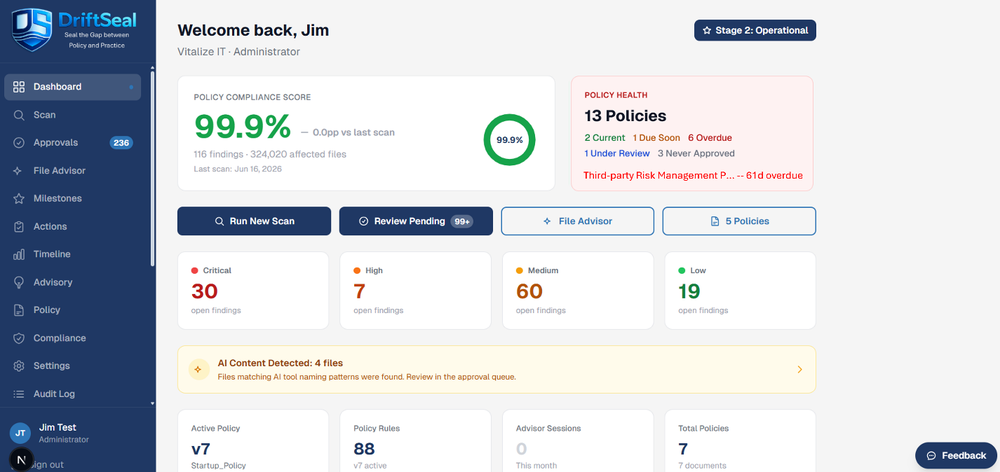
A straightforward loop: load your policy, connect your environment, scan it, and put every finding in front of a human. Screenshots below are from the live product.
1. Load policy→2. Connect storage→3. Scan & baseline→4. Review & act
1Upload and activate your policy
- Upload one or more policy documents (Word, PDF, or text) and activate the ones you want enforced.
- An AI engine extracts written policy language into structured, testable rules.
- Check policy for conflicts across documents, and manage the policy approval process itself — even before any storage connection exists.
- Get an estimated token cost before running a comparison, and set an authority document on a per-rule basis when policies overlap.
- No existing policy? Start from one of several built-in template policies.
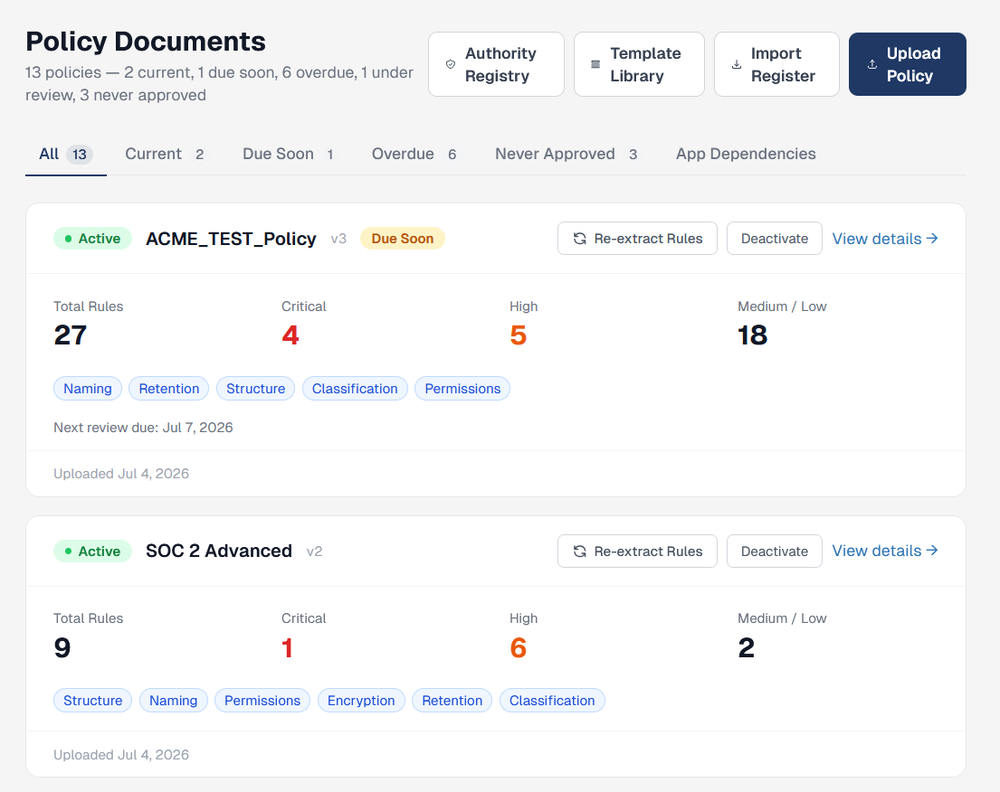
2Connect the storage location to be scanned
- Set up a connection to the environment you want DriftSeal watching, under Settings.
- Test the connection before relying on it.
- Configure path and file-extension filters or overrides to control exactly what gets scanned.
- Set up notification emails so the right people hear about new findings automatically.
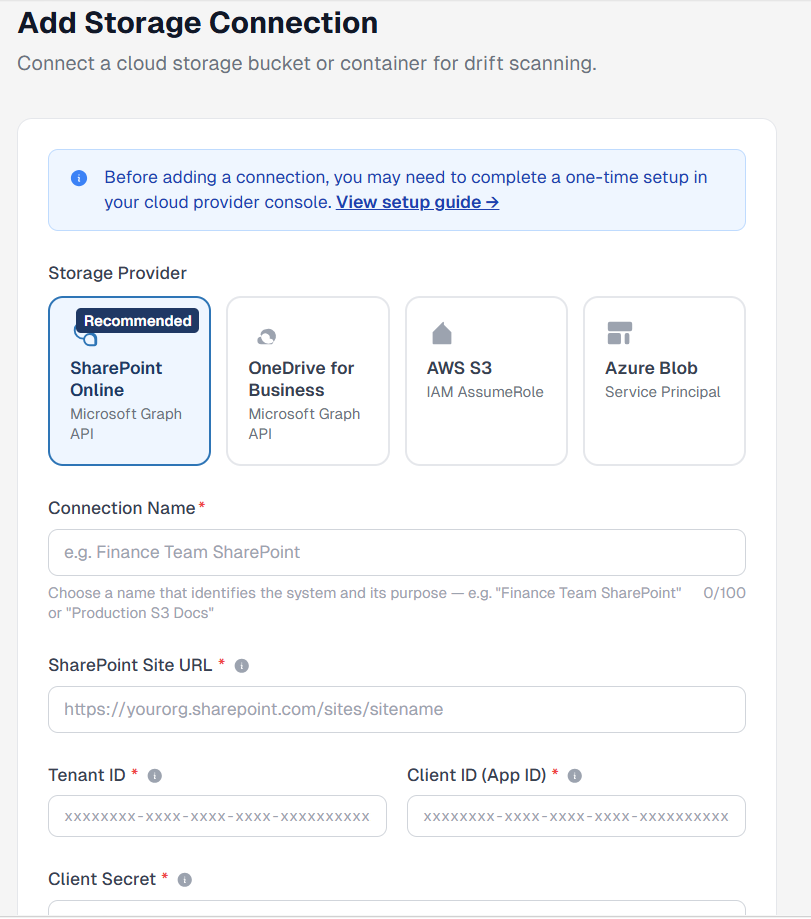
3Scan and set your baseline
- Once a connection is live and at least one policy is active, run a full audit or a custom scan against specific rule categories.
- Scans can be scheduled to run on a recurring incremental and/or full basis.
- The first scan sets your baseline; subsequent scheduled scans run incrementally from there.
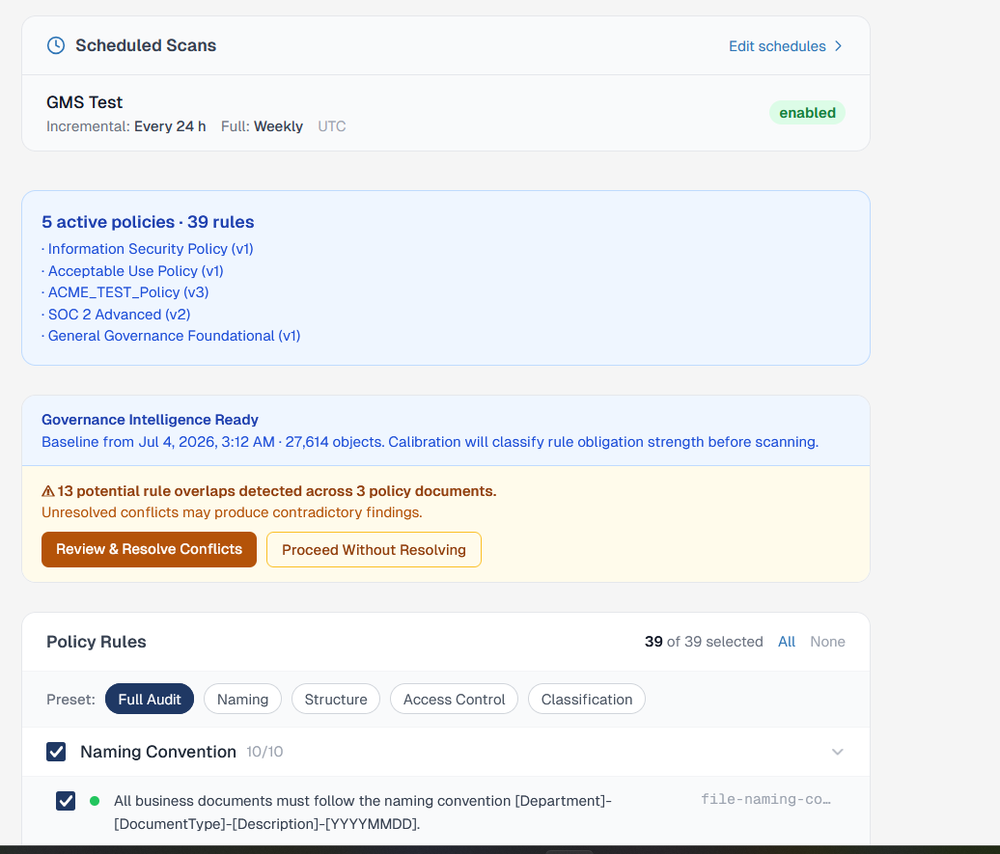
4Review results and take action
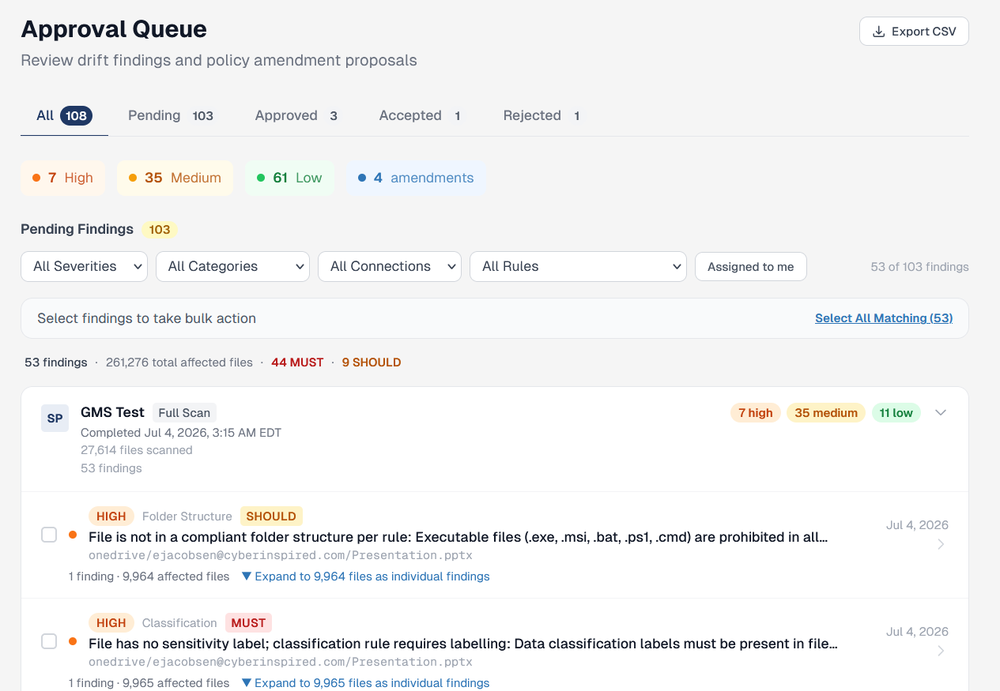
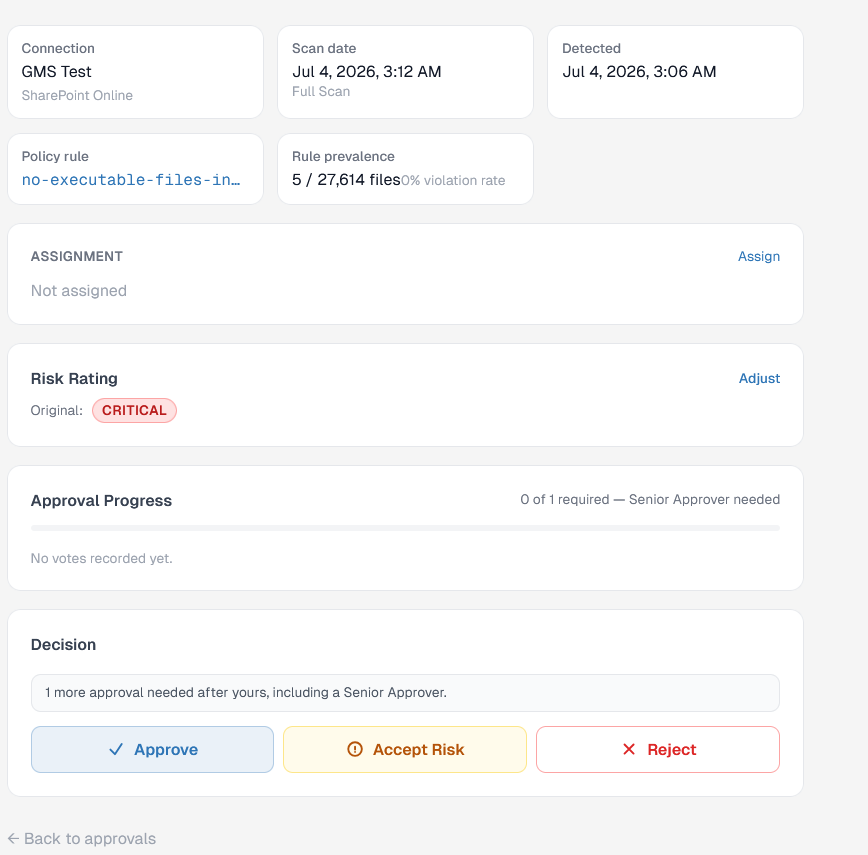
- Work findings individually or take bulk action — approve, accept, assign or reject — across many findings at once.
- Every decision is attributed to a person and written to the audit trail.
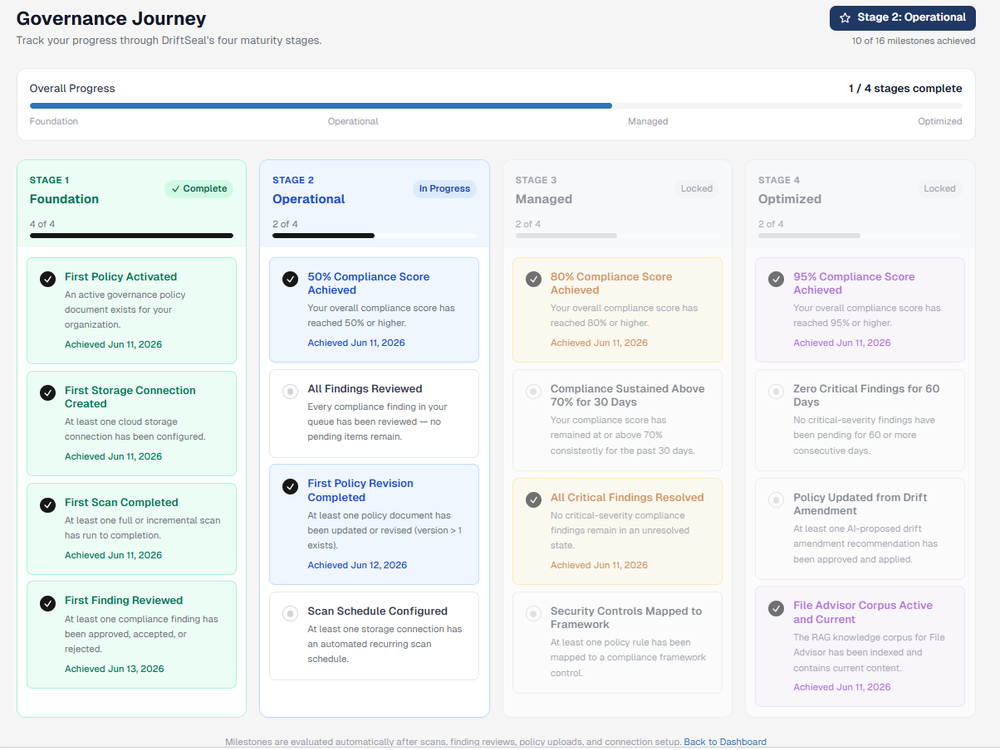
- Track rollout progress against a governance maturity model, from Foundation through Optimized, as your team works the queue.
Track your rollout, not just your findings
DriftSeal's Governance Journey view breaks your rollout into four maturity stages — Foundation, Operational, Managed, Optimized — with concrete milestones (first policy activated, compliance score thresholds, critical findings resolved) so your team and your leadership can see progress, not just a queue of open items.
How DriftSeal fits your stack
Built to extend your existing tools, not replace them by default.
Some vendors in this space run their own discovery and permissions scans as a byproduct of a broader platform. DriftSeal does that too — but that's not the point of the product. The point is turning what those scans (and DriftSeal's own) find into policy-aware detection, human-approved remediation, and audit-ready reporting. Where you already run identity governance or AI discovery tools, DriftSeal is designed to integrate with them and build governance rules around each tool's core strengths — extending what you have rather than asking you to rip it out. There are specific use cases where DriftSeal can take over a task those tools aren't built for, and we're glad to walk through where that line sits for your environment.
Integrate first
Point-of-integration architecture designed to consume identity and discovery signal from tools you already run.
Replace selectively
In specific use cases — typically where policy-vs-practice drift detection is the actual gap — DriftSeal can take on the task directly. That's a conversation, not a default.
Report continuously
Whatever combination of tools is in place, DriftSeal's job is making non-compliance easy to identify, remediate and report on so audits run smoother.
Security by design
Built the way a security team would build it.
DriftSeal holds a privileged view into how your environment is structured, and its architecture reflects that responsibility. These aren't policies on paper — they're structural properties of how the product works.
Metadata only, always
DriftSeal reads file names, paths, sizes, dates, owners and types — never file content. Content-retrieval calls aren't in the code path; there's nothing to turn on.
Read-only until a human says go
Scanning never moves, renames, deletes or re-permissions a file. Every recommendation sits in an approval queue until your team decides.
Append-only audit trail
Every scan, finding, decision and policy change is written to an insert-only log before the action completes — exportable evidence for your auditors.
Underneath that: per-organization data isolation enforced at the database layer, AES-256 encryption for connector credentials, and TOTP multi-factor authentication. We're happy to walk your security team through the full controls matrix and threat model.
Roadmap
Where DriftSeal is headed.
DriftSeal today is deliberately narrow so it can be deep. Here's what's in place now and what's coming next.
Available now
Microsoft 365 coverage — SharePoint and OneDrive
Policy ingestion, permissions, sharing and retention drift detection, and human-approved remediation.
Planned
AWS, then Google Workspace coverage
The same policy-vs-practice model, extended beyond M365 to AWS and Google environments as those integrations come online.
Planned
Configurable remediation
Today, every remediation requires human approval. The near-term goal is per-client configurable rules — auto-remediate for low-risk changes, require approval for higher-risk changes, and exclude DriftSeal from implementing changes entirely where you'd rather keep that fully manual. Any change flagged as higher-risk will always require human approval.
Planned
Change-management integration
Optional sync with tools like Jira so approved findings can flow into the change workflow your team already uses.
Direction
Policy ingestion beyond M365-specific rules
The goal is to ingest governance policy broadly — not just rules scoped to M365 — so DriftSeal can serve as a policy-vs-practice check across the environments an organization actually runs.
How DriftSeal compares
Faster to value than legacy DSPM platforms.
DriftSeal isn't trying to out-feature every platform in this space. It's built to close the specific, continuous loop between what your governance policy says and what your environment actually does — starting with M365 and expanding from there.
| Capability | DriftSeal | Broad DSPM / GRC platforms |
|---|---|---|
| Purpose-built for policy-vs-practice drift detection | Yes | Partial |
| Human-approval remediation by default | Yes | Varies |
| Immutable audit trail for SOC 2/ISO 27001 | Yes | Varies |
| Designed to integrate with existing IAM/discovery tools | Yes | Varies |
| Typical time to first findings | Days | Weeks to months |
Next step
Request a Demo
Start with the minimum information needed. After we have your contact details, you can share more context or select a time.
Secondary conversion
Not ready for a demo yet?
Join the DriftSeal mailing list for product updates, or explore a sample report and recorded walkthrough first.
Why we built this
Built by someone who's answered these questions from the other side of the table.
DriftSeal comes out of nearly 30 years in IT engineering and cybersecurity — including roles as a Cybersecurity Governance Officer, interim CISO, and senior solutions advisor to large enterprises. That's a lot of time sitting in the audit, feeling the "prove it" moment, and watching strong policies quietly erode because nobody had the hours to keep checking them by hand. DriftSeal is the tool we wished existed.
What that means for your data
- Your organization's data is isolated at the database layer — never shared across customers.
- Nothing is retained that DriftSeal doesn't need: policies, findings, decisions and the audit log — never file content, because it's never accessed.
- If you ever leave, you take your policies, findings history and full audit trail with you.
Frequently asked questions
What leaders typically ask
Does DriftSeal automatically change permissions in our environment?
Today, every proposed remediation routes through a human-approval queue — nothing is modified without your team signing off. Configurable auto-remediation is on the roadmap: an admin will be able to approve proposed changes to run automatically within specific guardrails they define, while higher-risk changes will always require explicit human approval.
Do we need SharePoint and OneDrive, or does DriftSeal cover other platforms?
DriftSeal is built for Microsoft 365 — SharePoint and OneDrive — today, which is where our policy-vs-practice model is deepest. AWS coverage is next on the roadmap, with Google Workspace to follow, using the same continuous drift-detection approach.
Will DriftSeal replace our existing identity governance or AI discovery tools?
Not by default. Those platforms do identity governance and AI discovery well, and DriftSeal is designed to integrate with them — building governance rules around each tool's core strengths rather than duplicating them. There are specific use cases where DriftSeal can take over a task directly; that's a conversation about your environment, not a blanket claim.
How does DriftSeal help with SOC 2 or ISO 27001 audits?
Every detected finding, remediation decision, and action is written to an immutable audit trail, structured so it can be handed directly to an auditor as evidence of ongoing governance enforcement.
How quickly can we see results?
DriftSeal deploys against your existing M365 tenant and typically surfaces initial drift findings within days, not the weeks-to-months timeline common with broader DSPM rollouts.
Where does DriftSeal fit next to a GRC platform like AuditBoard?
AuditBoard and similar platforms are the system of record for an organization's overall audit and risk program — audit management, risk register, controls testing, across every business unit and framework. DriftSeal doesn't compete with that scope. It's a focused evidence source for one control domain: continuous, automatic detection of drift between governance policy and actual environment behavior, with human-approved remediation and an audit trail built for that domain. Organizations already running a GRC platform typically use DriftSeal to feed it more current, better-sourced evidence for that specific control area rather than replace it.